
OVERVIEW
Healthcare organizations are increasingly adopting Remote Patient Monitoring (RPM) solutions to improve patient outcomes, reduce clinician workload, and enable proactive models of care. Traditional intermittent vital sign measurements provide periodic snapshots of a patient's condition and may delay the identification of physiological deterioration. Continuous monitoring using wearable medical devices enables clinicians to detect changes in patient condition earlier, allowing timely intervention and improving the quality and efficiency of care. This approach supports multiple stages of the patient journey, including pre-operative assessment, inpatient monitoring, post-operative recovery, and hospital-at-home or post-discharge care. Continuous monitoring has the potential to reduce avoidable escalations, improve patient throughput, optimize staff workflows, and enhance patient safety through earlier detection of clinical deterioration.
This runbook provides Cisco partners and customers with implementation guidance for deploying a RPM solution using Corsano Health wearable medical devices integrated with Cisco. This solution combines Cisco's wireless infrastructure and Corsano's continuous patient monitoring platform to deliver real-time physiological monitoring with location-aware clinical intelligence.
This runbook outlines the reference architecture, deployment workflow, infrastructure requirements, configuration procedures, validation steps, operational considerations, and support model required to successfully deploy and operate the Cisco Spaces Remote Patient Monitoring solution. By combining continuous physiological monitoring with indoor location intelligence, healthcare organizations can enhance patient safety, improve clinical workflows, and establish a scalable foundation for future Medical IoT use cases across the care continuum.
TARGET AUDIENCE
This runbook is intended for stakeholders involved in the design, deployment, and operation of Remote Patient Monitoring solutions within healthcare environments, including:
-
Hospital IT Administrators responsible for network infrastructure and system integration
-
Clinical Engineering Teams managing device integration, validation, and ongoing operational support
-
Cisco Partners and System Integrators deploying and configuring healthcare solutions for customer environments
-
Facility and Operations Managers overseeing campus-wide safety initiatives and ensuring alignment with organizational policies
HOW IT WORKS
The Remote Patient Monitoring (RPM) solution combines Cisco wireless infrastructure, Cisco Spaces Sensor Connect, and the Corsano continuous patient monitoring platform to enable real-time physiological monitoring of patients throughout their care journey. The solution continuously captures patient vital signs using wearable medical devices and securely delivers this data to clinicians through the Corsano platform.
Cisco Catalyst wireless infrastructure serves as the underlying IoT transport layer for the solution. By leveraging Bluetooth Low Energy (BLE) capabilities built into Cisco Catalyst access points, hospitals can deploy continuous patient monitoring without installing a dedicated BLE gateway infrastructure. This allows healthcare organizations to extend the value of their existing wireless investment while supporting additional Medical IoT use cases on the same infrastructure.
Patient Onboarding
Patients are onboarded using the Corsano HCP application. During the onboarding process, the patient profile is created, the wearable bracelet is assigned and paired, Wearing Optimization is completed, and blood pressure cuff calibration is performed when applicable. Once onboarding is complete, the patient begins continuous monitoring.
Continuous Patient Monitoring
Once activated, the Corsano wearable periodically broadcasts patient telemetry using Bluetooth Low Energy (BLE). Cisco Catalyst Access Points receive these BLE advertisements and forward the telemetry through Cisco Sensor Connect to the Corsano platform for continuous monitoring. Healthcare professionals can monitor patient information through the Corsano Portal and Corsano HCP application, which provide access to patient details, physiological measurements, historical trends, and clinical response information. The platform also supports NEWS2 scoring and blood pressure measurements when configured as part of the clinical workflow.BLE Telemetry Collection
Cisco Catalyst Access Points equipped with integrated Bluetooth® Low Energy (BLE) radios continuously scan for BLE advertisements transmitted by Corsano wearable devices. Acting as distributed BLE gateways, the access points collect device telemetry and forward it through the Cisco wireless infrastructure to Cisco Sensor Connect. This architecture eliminates the need for dedicated BLE gateway hardware, allowing healthcare organizations to leverage their existing Cisco wireless infrastructure for continuous patient monitoring.
Telemetry Processing and Clinical Monitoring
Cisco Sensor Connect serves as the telemetry transport layer between the Cisco wireless infrastructure and the Corsano platform. BLE telemetry collected by the Cisco wireless infrastructure is securely streamed to the Corsano On-Premises Gateway using MQTT. The gateway subscribes to the telemetry stream, validates and processes the incoming data, and securely forwards relevant patient information to the Corsano Health Cloud over HTTPS. Healthcare professionals can then access continuous patient monitoring, physiological measurements, historical trends, and clinical information through the Corsano Portal and Corsano HCP application.
Clinical Monitoring and Decision Support
The Corsano platform continuously evaluates incoming patient telemetry against configured clinical monitoring parameters. Healthcare professionals can review patient status, historical trends, NEWS2 scores, and clinical response information through the Corsano Portal or HCP mobile application. This enables clinicians to monitor patient condition continuously and prioritize care based on patient status.
Patient Off-boarding
At the completion of monitoring or upon patient discharge, the wearable bracelet can be unassigned from the patient profile using the Corsano HCP application. This removes the association between the patient and the wearable, allowing the device to be prepared for reuse in subsequent patient onboarding workflows.
Scalable Medical IoT Platform
Cisco Sensor Connect architecture provides a scalable Medical IoT foundation capable of supporting large numbers of wearable medical devices across healthcare facilities. Because the solution leverages the existing Cisco wireless infrastructure as the BLE transport layer, hospitals can expand continuous patient monitoring deployments without introducing parallel gateway networks or additional BLE infrastructure.
This architecture not only enables Remote Patient Monitoring but also establishes a foundation for future healthcare IoT services, allowing organizations to extend the same infrastructure to additional use cases such as asset tracking, environmental monitoring, workflow optimization, and patient flow analytics.
SOLUTION COMPONENTS
This section identifies the hardware, software, and application components required to deploy the Remote Patient Monitoring solution. Cisco provides the wireless infrastructure, BLE transport, and Sensor Connect services, while Corsano provides the wearable medical devices, patient monitoring platform, and clinical applications.
Cisco Components
|
Device |
Function |
Recommended Versions |
|---|---|---|
|
Cisco Catalyst 9800 Wireless Controller |
Hosts the Cisco Sensor Connect (IoT Orchestrator) application and manages BLE telemetry from Cisco access points. |
Cisco IOS XE 17.15.5 or 17.18+ https://www.cisco.com/c/en/us/support/ios-nx-os-software/ios-xe-17/products-release-notes-list.html Virtual WLC is not supported for this use case. |
|
Cisco Catalyst Access Points |
Operate as BLE gateways that scan Corsano bracelet advertisements and forward telemetry to Sensor Connect. |
|
|
Cisco Sensor Connect (IoT Orchestrator) |
Runs as a containerized application within the Catalyst 9800 WLC using Cisco IOx. Receives BLE telemetry from Catalyst APs, manages device communication, and securely streams telemetry to the Corsano on-premises gateway. |
1.2.1 or later |
Corsano Components
|
Device |
Function |
|---|---|
|
Corsano Wearable Bracelet 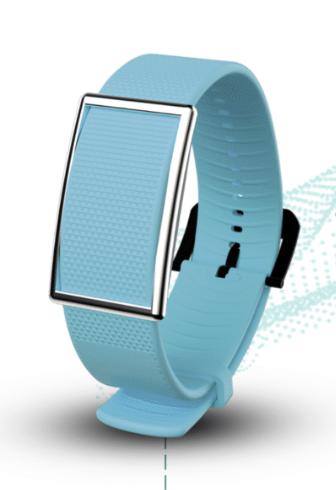
|
FDA-cleared wearable medical device that continuously measures patient physiological parameters and broadcasts telemetry using Bluetooth Low Energy (BLE). Supports continuous monitoring of physiological measurements such as heart rate, respiratory rate, SpO₂, skin temperature, activity, and other supported clinical parameters. |
|
Corsano On-Premises Gateway |
Receives BLE telemetry from Cisco Sensor Connect using MQTT, processes and validates incoming physiological data, and securely forwards clinically relevant information to the Corsano Health Cloud. |
|
Corsano Health Cloud |
Cloud platform that stores patient telemetry, performs clinical analytics, and provides access to patient dashboards, alerts, and reporting. |
|
Corsano Portal |
Web-based clinical dashboard used by healthcare providers to monitor patient vital signs, historical trends, alarms, and patient compliance. |
|
Corsano HCP Mobile App |
Mobile application used by healthcare professionals for patient onboarding, bracelet assignment, patient monitoring, and clinical notifications. Supports patient registration, bracelet pairing, firmware updates, wearing optimization, blood pressure cuff calibration, and patient offboarding. |
PREREQUISITES
Cisco Prerequisites
Before deploying the Remote Patient Monitoring solution, ensure that the Cisco wireless infrastructure meets all prerequisites. Refer to the guide for the latest supported hardware, software, and deployment requirements: Cisco Spaces Connect for IoT Services – Prerequisites
One of the following eligible licenses is required:
-
Cisco Wireless Advantage
-
Cisco Spaces Smart Operation
-
Cisco Spaces ACT
-
Cisco Spaces Unlimited
Cisco Sensor Connect supports a maximum number of concurrent BLE device connections per access point for operations that require an active BLE connection (such as device configuration or firmware updates). This limit varies by AP model and should be reviewed during solution planning to ensure operational activities such as firmware updates can be performed efficiently at scale.
Corsano Prerequisites
Corsano Health Platform
-
-
A valid Corsano Health tenant must be provisioned before deployment.
-
Contact Corsano Support to provision the environment and provide administrator access.
-
Corsano On-Premises Gateway
-
-
The Corsano On-Premises Gateway must be installed within the customer network.
-
During installation, Corsano Support will register the gateway using:
-
Gateway IP address
-
Gateway Serial Number
-
Cisco Sensor Connect application token
-
-
Corsano Wearable Devices
-
-
Corsano wearable monitoring bracelets must be available for deployment.
-
Devices should be fully charged before patient onboarding.
-
Verify firmware compatibility prior to deployment.
-
Corsano HCP Portal
-
-
Healthcare professionals (HCPs) requiring access must first register through the Corsano Portal.
-
Hospital administrators must approve and assign HCP users to the appropriate department before monitoring activities can begin.
-
Corsano HCP Mobile Application
-
-
Install the Corsano HCP mobile application on supported mobile devices used for patient onboarding.
-
The application is used to:
-
Register patients
-
Pair wearable devices
-
Perform Wearing Optimization
-
Pair blood pressure cuffs (if applicable)
-
Offboard patients upon discharge
-
-
Patient Onboarding Materials
-
-
Ensure patient wristbands, Corsano wearable devices, and onboarding QR codes or identifiers are available before beginning patient enrollment.
-
If blood pressure monitoring is required, compatible BP cuffs should be paired prior to completing patient onboarding.
-
Clinical Workflow Preparation
-
-
Define patient monitoring workflows, department assignments, and clinical escalation procedures prior to deployment.
-
Verify that healthcare professionals have received training on patient onboarding, wearable placement, and portal usage before the solution is placed into production.
-
INFRASTRUCTURE PLANNING AND DESIGN
Proper infrastructure planning is critical to delivering reliable Remote Patient Monitoring outcomes. Cisco Sensor Connect leverages the existing Cisco wireless infrastructure to collect Bluetooth® Low Energy (BLE) telemetry from Corsano wearable devices, eliminating the need for dedicated BLE gateway hardware.
Unlike traditional Wi-Fi deployments that prioritize client connectivity, Remote Patient Monitoring deployments should be designed to ensure continuous BLE telemetry collection across the monitored care environment. Infrastructure should therefore be designed to support reliable telemetry collection and clinical monitoring outcomes rather than wireless connectivity alone.
The recommended deployment workflow for the solution is:
-
Plan the Cisco wireless infrastructure.
-
Deploy the Cisco Catalyst Access Points.
-
Install and configure the Catalyst 9800 Wireless LAN Controller.
-
Deploy Cisco Sensor Connect (IoT Orchestrator).
-
Validate BLE telemetry collection and network connectivity.
-
Deploy the Corsano platform.
-
Begin patient onboarding.
Following this sequence ensures the Cisco infrastructure is fully operational before the clinical applications and wearable devices are introduced.
AP Planning and BLE Design Considerations
Cisco Catalyst Access Points function as distributed BLE gateways for Corsano wearable devices. The number and placement of access points should be determined during the design phase based on the physical characteristics of the healthcare environment and the expected monitoring scale.
When planning the deployment, consider:
-
Building construction and materials (for example reinforced concrete, lead-lined rooms, or thick walls)
-
Patient room size and floor layout
-
Ceiling height
-
Expected number of concurrently monitored wearable devices
AP density should be validated through a wireless site survey and pilot deployment before production rollout, as healthcare environments vary by layout, construction, and monitoring requirements.
Cisco recommends the following design best practices:
-
Design the wireless infrastructure for BLE telemetry collection and location outcomes rather than Wi-Fi client coverage alone.
-
Ensure access points are distributed throughout patient care areas, including room perimeters and corridors, to provide continuous BLE coverage.
-
Each wearable device should be detected by at least three access points with an RSSI of –75 dBm or stronger to support reliable X/Y location calculations.
-
Where practical, maintain an AP-to-device proximity of approximately 50 ft (15–20 m). Additional AP density may be required depending on wall construction, room geometry, and building materials.
-
Position access points accurately on digital floor maps, including antenna orientation where available, to improve operational visibility and simplify troubleshooting.
-
Validate BLE coverage and telemetry performance before onboarding patients into production.
Cisco Sensor Connect supports a finite number of concurrent active BLE device connections per access point. These limits vary by Catalyst AP model and should be considered when planning large-scale deployments or scheduling firmware updates.
Catalyst 9800 WLC Planning
Deploy and size the Cisco Catalyst 9800 Wireless LAN Controller based on the expected number of access points, wireless clients, and Remote Patient Monitoring scale. For production healthcare deployments, Cisco recommends deploying Catalyst 9800 controllers as an HA Stateful Switchover (HA SSO) pair to provide controller redundancy and maintain uninterrupted wireless services during controller failures.
Select the appropriate Catalyst 9800 platform based on the supported AP and client scale for the deployment.
Map and Location Readiness (Optional but recommended)
Accurate floor maps and infrastructure topology remain important for operational visibility and future location-aware healthcare workflows.
Organizations should configure Cisco Catalyst Center (or supported mapping sources) with:
-
Accurate building hierarchy
-
Floor maps
-
Correct access point placement
Maintaining accurate infrastructure information simplifies troubleshooting, infrastructure monitoring, and future expansion into additional use cases.
REFERENCE ARCHITECTURE
HOW COMPONENTS INTERACT
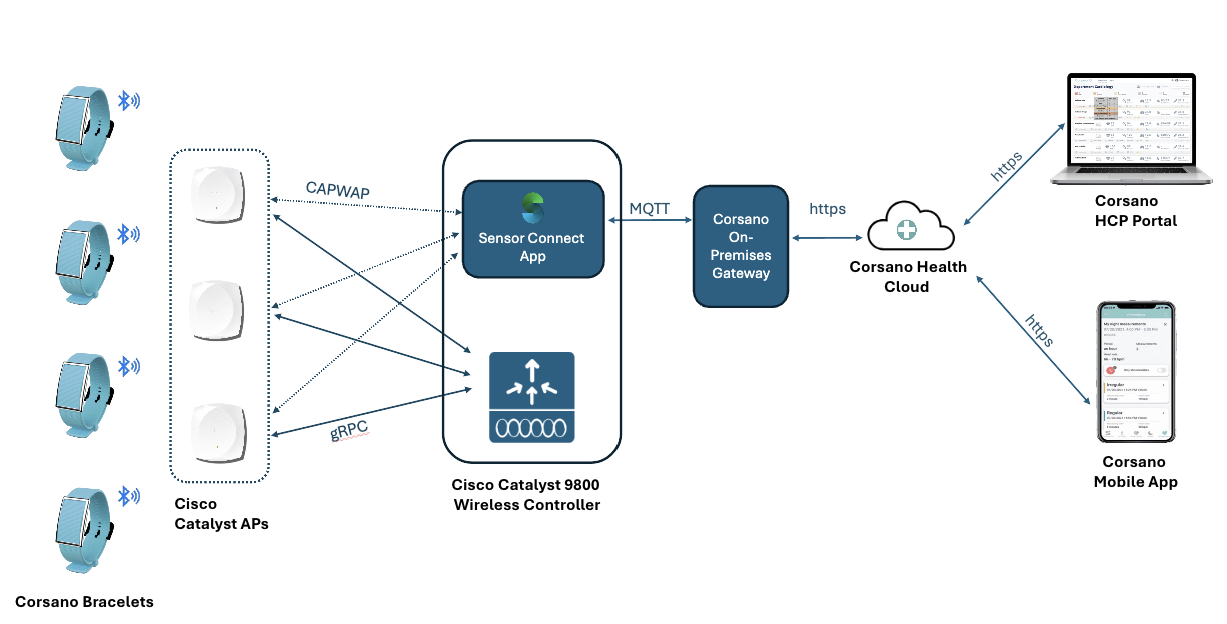
The Remote Patient Monitoring solution is orchestrated through structured telemetry exchange between Corsano wearable medical devices, Cisco Catalyst wireless infrastructure, Cisco Sensor Connect, and the Corsano Health platform. This architecture enables continuous collection of physiological telemetry, secure transport of patient data, and real-time monitoring through the Corsano Portal and HCP mobile application.
Once a Corsano wearable device is assigned to a patient and activated, it begins broadcasting periodic Bluetooth Low Energy (BLE) advertisements containing physiological telemetry and device information. Depending on the monitoring configuration, transmitted telemetry may include heart rate, respiratory rate, blood oxygen saturation (SpO₂), skin temperature, activity, motion, battery status, and other supported physiological parameters.
BLE Telemetry Collection by Cisco Infrastructure
Cisco Catalyst Access Points equipped with integrated BLE radios continuously scan for BLE advertisements transmitted by nearby Corsano wearable devices. The access points capture the device MAC address, timestamp, RSSI, and BLE telemetry payload before forwarding the information to the Cisco Catalyst 9800 Wireless LAN Controller over CAPWAP.
Cisco Catalyst Access Points function as distributed BLE gateways, allowing the existing wireless infrastructure to collect patient telemetry without requiring dedicated BLE gateway hardware.
Telemetry Processing by Cisco Sensor Connect
The Catalyst 9800 Wireless LAN Controller hosts the Cisco Sensor Connect (IoT Orchestrator) application, which serves as the telemetry transport layer for the solution. The wireless controller forwards BLE telemetry to Sensor Connect using gRPC. Sensor Connect aggregates BLE telemetry received from multiple access points and securely streams the collected data to the Corsano On-Premises Gateway using MQTT.
This architecture allows Cisco Sensor Connect to act as the secure integration point between the Cisco wireless infrastructure and the Corsano platform while maintaining scalable communication with large numbers of wearable medical devices.
Telemetry Processing by Corsano
The Corsano On-Premises Application subscribes to the MQTT telemetry stream generated by Cisco Sensor Connect.
Upon receiving telemetry, the gateway:
-
Processes and validates incoming physiological measurements
-
Filters irrelevant or duplicate telemetry
-
Associates telemetry with registered Corsano wearable devices
-
Packages clinically relevant information for cloud transmission
Only validated patient telemetry is securely forwarded to the Corsano Health Cloud over HTTPS, reducing unnecessary network traffic while ensuring reliable delivery of clinical information.
Clinical Processing within Corsano Health Cloud
The Corsano Health Cloud receives physiological telemetry from the on-premises gateway and performs centralized patient monitoring and clinical analysis.
The platform:
-
Associates wearable devices with patient records
-
Stores historical physiological measurements
-
Continuously analyzes incoming vital signs
-
Evaluates configurable clinical thresholds and NEWS2 scoring
-
Generates alerts for abnormal physiological conditions
-
Maintains patient history, dashboards, and reporting
Healthcare professionals access this information through the Corsano Portal or Corsano HCP mobile application, allowing clinicians to monitor patients in near real time from any authorized location.
Clinical Applications and Healthcare Workflows
The Corsano Portal serves as the primary clinical interface for monitoring patients and reviewing physiological data. Healthcare professionals can view current patient status, historical trends, NEWS2 scores, and clinical response information while managing patient onboarding and monitoring workflows.
The Corsano HCP mobile application extends these capabilities by enabling clinicians to onboard new patients, pair wearable devices, perform wearing optimization, monitor patient status, and access patient information while remaining mobile throughout the healthcare facility.
Operational Responsibility Model
The solution architecture maintains clear ownership boundaries across the Cisco infrastructure and Corsano clinical platform.
Cisco Infrastructure is responsible for:
-
Cisco Catalyst wireless infrastructure
-
Cisco Sensor Connect
-
BLE telemetry collection and Secure telemetry transport
-
Infrastructure monitoring and connectivity
Corsano Platform is responsible for:
-
Wearable medical devices
-
Patient onboarding and device association
-
Physiological telemetry processing
-
Clinical analytics and NEWS2 scoring
-
Patient dashboards and reporting
-
Clinical alerts and healthcare workflows
This separation enables independent lifecycle management of the infrastructure and clinical application layers while providing a scalable and secure architecture for continuous patient monitoring.
INSTALLATION AND CONFIGURATION STEPS
Cisco Infrastructure Deployment
Deploy Cisco Catalyst Access Points
Deploy Cisco Catalyst Access Points according to the AP Planning and Deployment recommendations described in the Infrastructure Setup section. Ensure that the deployed access points are supported for Cisco Sensor Connect and meet the minimum hardware and software requirements documented in the Cisco Sensor Connect Prerequisites Guide.
Once deployed, verify that all access points are operational, joined to the Catalyst 9800 Wireless LAN Controller, and providing the intended BLE coverage before proceeding with the remainder of the installation.
Install and Configure the Catalyst 9800 Wireless LAN Controller
Deploy and configure a supported Cisco Catalyst 9800 Wireless LAN Controller following Cisco best practices. The controller is responsible for managing the Cisco Catalyst Access Points and hosting the Cisco Sensor Connect application.
Complete the controller installation, upgrade to a supported Cisco IOS XE release, and verify that all access points have successfully joined the controller.

Install Cisco Sensor Connect (IoT Orchestrator)
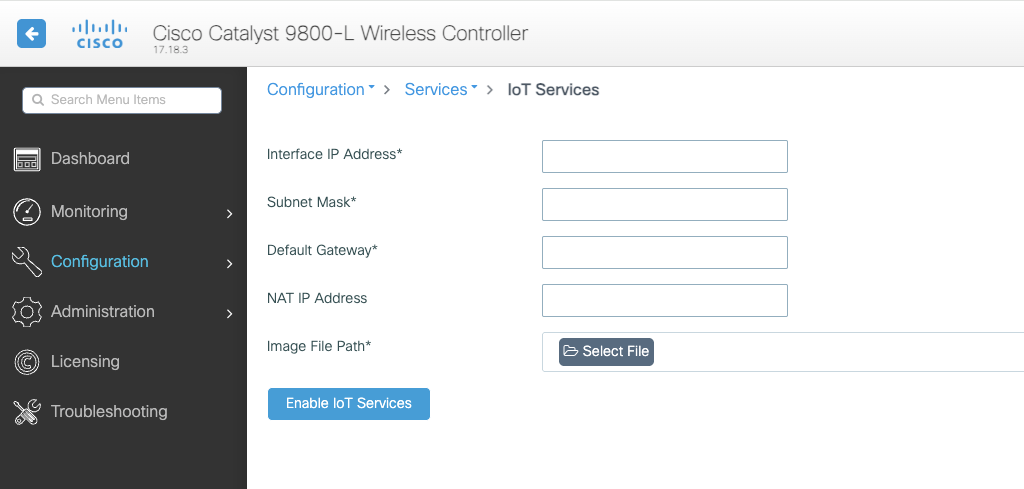
Cisco Sensor Connect (IoT Orchestrator) provides the BLE telemetry transport layer between the Cisco wireless infrastructure and the Corsano Remote Patient Monitoring platform. It runs as a Cisco IOx application on the Catalyst 9800 Wireless LAN Controller and is responsible for receiving BLE telemetry from Cisco Catalyst Access Points and securely streaming it to the Corsano On-Prem App.
Complete the deployment of Cisco Sensor Connect by following the Cisco Sensor Connect Quick Start Guide.
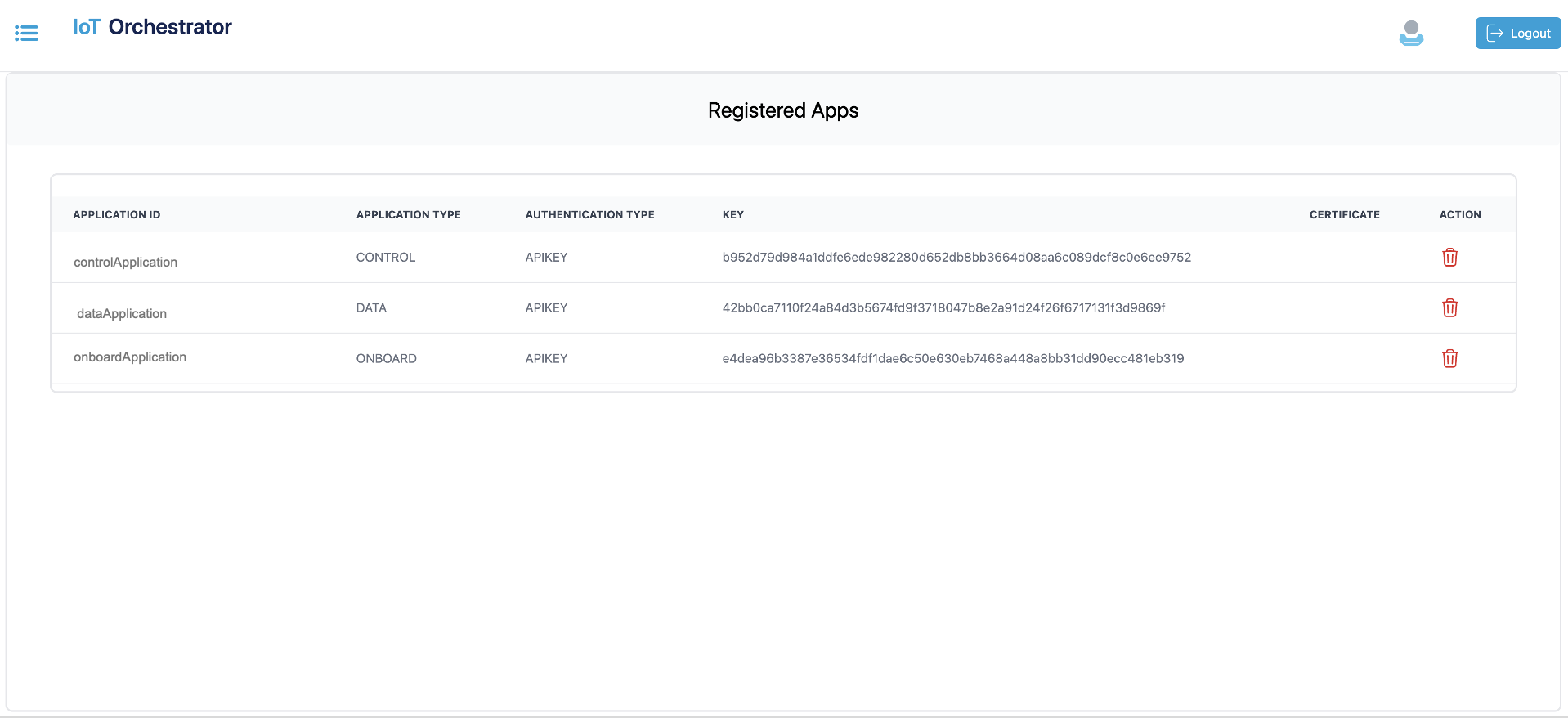
Create Token for Corsano App
To connect to the Corsano devices using the Sensor Connect App, generate keys for onboarding, control, and data receiver Apps.
Refer to this section for detailed steps
Corsano Platform Deployment
Install the Corsano On-Prem App
Once Cisco infrastructure validation is complete, contact Corsano Support.
Corsano Support will:
-
Install the Gateway software
-
Register the Gateway
-
Configure MQTT connectivity
-
Register the Sensor Connect application token
-
Validate communication with the Corsano Health Cloud
Refer to the Cisco Infrastructure Getting Started Guide for the complete installation workflow.
Configure the Corsano Platform
Deploy the Corsano platform by completing the following:
-
Configure the hospital environment
-
Create departments
-
Configure administrator accounts
-
Register Healthcare Professional (HCP) users
-
Validate communication between the Gateway and Corsano Health Cloud
Detailed deployment procedures are available in the Corsano Installation Guide and associated Corsano deployment documentation.
Install the Corsano HCP Application
Install the Corsano HCP application on supported mobile devices used by healthcare professionals.
The application is used to:
-
Register healthcare professionals
-
Onboard patients
-
Pair wearable devices
-
Perform Wearing Optimization
-
Monitor patient telemetry
-
Offboard patients
Refer to the HCP Onboarding Guide for complete installation and onboarding procedures.
Onboard Patients
After the Cisco infrastructure and Corsano platform have been successfully deployed, healthcare professionals can begin onboarding patients.
Patient onboarding includes:
-
Patient registration
-
Bracelet assignment
-
Device pairing
-
Firmware update (if required)
-
Wearing Optimization
-
Blood pressure cuff calibration (if applicable)
-
Verification of physiological telemetry
Following successful onboarding, patient data becomes available through the Corsano Portal and HCP application for continuous monitoring.
Infrastructure Readiness Checklist
- Cisco Catalyst wireless infrastructure is fully operational
- Cisco Sensor Connect is installed and running
- Supported Catalyst access points are deployed throughout monitored areas
- Required Cisco Spaces licenses have been activated
- Required firewall ports are open
- Network connectivity between Cisco infrastructure and Corsano App has been confirmed
- Sensor Connect application token has been generated for Corsano integration
INTEGRATION VALIDATION CHECKLIST
The following validation steps should be completed before placing the Remote Patient Monitoring solution into production. This checklist verifies that the Cisco infrastructure, Cisco Sensor Connect, Corsano platform, and patient monitoring workflows are operating correctly.
1. Verify Cisco Infrastructure Status
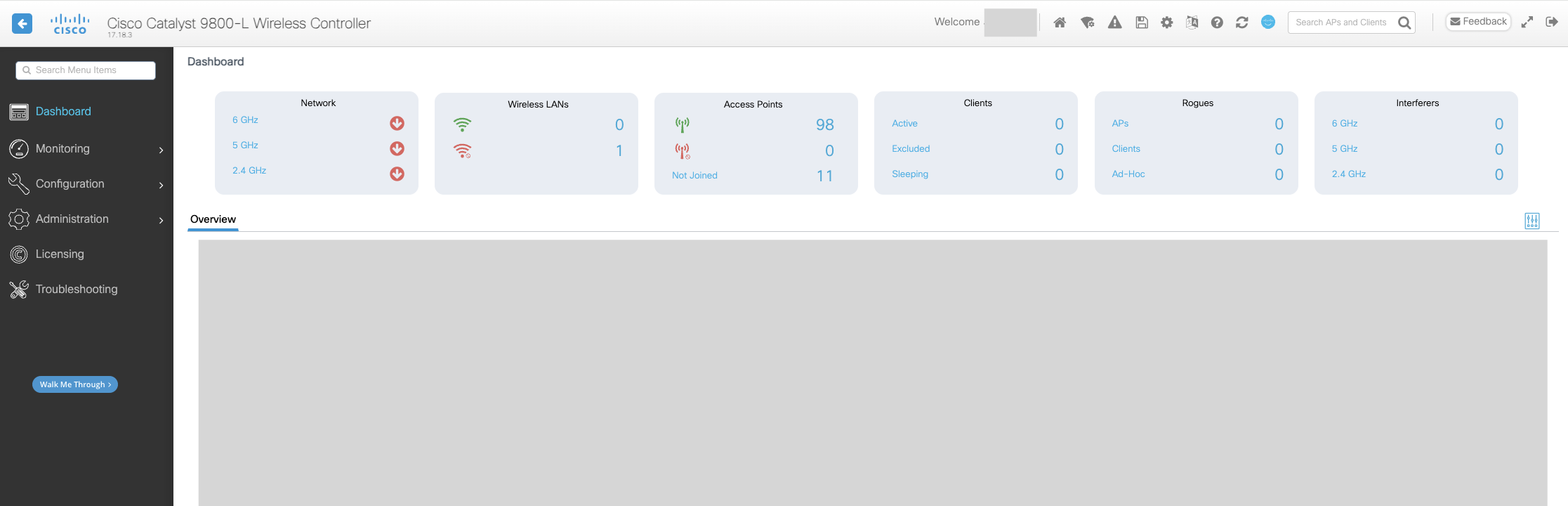
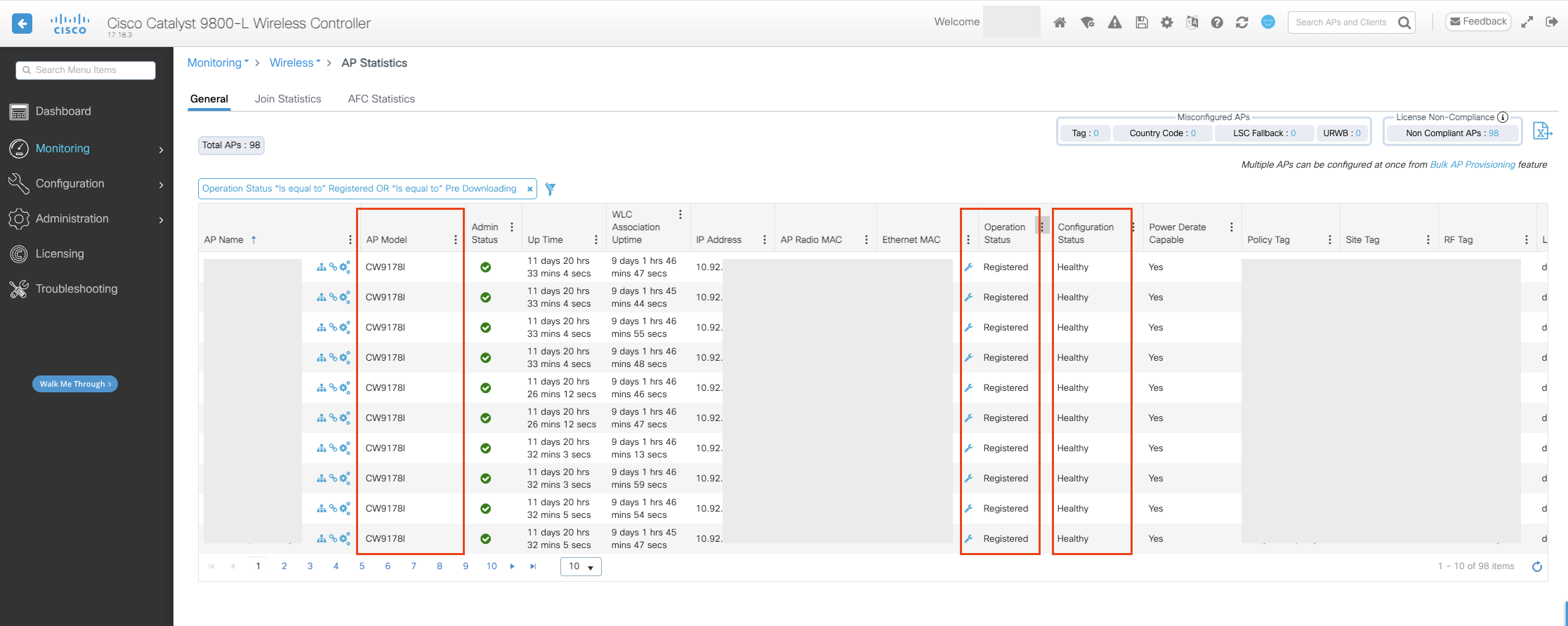
Confirm that the Cisco wireless infrastructure is operational and meets the minimum software requirements. Verify that the Catalyst 9800 Wireless LAN Controller, Cisco Catalyst Access Points, and Cisco Sensor Connect are healthy and communicating correctly.
2. Validate Sensor Connect Health
Confirm that Cisco Sensor Connect is running successfully on the Catalyst 9800 Wireless LAN Controller. Verify that BLE telemetry is being received from the access points and that communication with the has been successfully established.
3. Validate BLE Telemetry Collection
Using a test Corsano wearable, verify that BLE advertisements are detected by the Cisco wireless infrastructure. Confirm that Sensor Connect receives telemetry from the wearable and that no communication errors are reported.
4. Verify Gateway Connectivity
Confirm that the Corsano On-Premises Gateway is successfully connected to Cisco Sensor Connect using MQTT and is forwarding telemetry to the Corsano Health Cloud over HTTPS.
5. Validate Corsano Platform Connectivity
Log in to the Corsano Portal and verify that the gateway is online and communicating with the Corsano Health Cloud. Confirm that Healthcare Professional (HCP) users can successfully access the portal and assigned departments.
6. Perform Patient Onboarding Validation
Using the Corsano HCP application, onboard a test patient by registering the patient, pairing a wearable device, and completing the Wearing Optimization workflow. Verify that the wearable is successfully assigned to the patient profile.
7. Validate Physiological Telemetry
Confirm that physiological measurements from the wearable device are visible within the Corsano Portal. Verify that supported vital signs update continuously and that patient information is displayed correctly.
8. Validate Clinical Monitoring and Alerts
Where clinical thresholds or NEWS2 scoring are configured, simulate a test scenario and verify that the Corsano platform correctly evaluates patient telemetry and generates the expected clinical alerts or notifications.
9. Validate Mobile Application Workflow
Confirm that healthcare professionals can access the Corsano HCP mobile application, monitor patient status, and view patient telemetry using the assigned department and user credentials.
10. Perform End-to-End Workflow Validation
Complete a full operational workflow using a test patient, beginning with patient onboarding and ending with continuous physiological monitoring. Verify that telemetry is collected by Cisco infrastructure, processed by Sensor Connect, delivered to the Corsano platform, and displayed correctly in both the Corsano Portal and HCP mobile application. Successful completion of this validation confirms that the Remote Patient Monitoring solution is ready for production deployment.
SUPPORT AND ESCALATION
For support channels, case creation, ownership, and escalation procedures, refer to the Cisco Spaces Support and Escalation Process for Partner Ecosystem.
REFERENCES
Cisco Documentation
Corsano Documentation
FEEDBACK AND CONTINUOUS IMPROVEMENT
This runbook is a living document that evolves based on real-world deployments and customer feedback. Your input helps us improve accuracy, clarity, and completeness of the runbook.
Submit Feedback: Runbook Feedback Form
Email: ramyana2@cisco.com
For technical support issues, please follow the Support and Escalation Process outlined in this document.