OVERVIEW
The Cisco Spaces Partner Ecosystem enables customers to extend the Cisco Spaces platform through validated partner applications and integrations. As these solutions span multiple platforms and organizations, successful operations depend on a coordinated support model between Cisco Spaces, Ecosystem Partners, Cisco Technical Assistance Center (TAC), and the customer.
This document defines the standard support, monitoring, and escalation framework for partner applications integrated with Cisco Spaces. It establishes clear ownership boundaries, support workflows, communication channels, and escalation paths to ensure timely issue resolution and a consistent support experience across all stakeholders.
The guidance in this document applies throughout the lifecycle of a customer deployment—from onboarding and production operations to incident management and post-incident review. It is intended to help customers, partners, and Cisco teams quickly identify the appropriate support organization, understand their respective responsibilities, and collaborate effectively when resolving issues that span multiple systems.
SCOPE
This document defines the standard support, monitoring, and escalation model for Cisco Spaces deployments that include validated Ecosystem Partner applications and integrations.
It describes how Customers, Ecosystem Partners, Cisco Spaces, and Cisco Technical Assistance Center (TAC) collaborate to identify, troubleshoot, escalate, resolve, and communicate issues across the lifecycle of a joint deployment.
This guide applies to:
-
Production deployments
-
Trial and Proof of Value (PoV) deployments
-
Cisco Spaces Partner Apps
-
IoT devices listed in Cisco Spaces Device Marketplace
-
Cisco Spaces Partner Ecosystem integrations
-
Supported APIs, event streams, and platform integrations
The document establishes standard operating procedures for joint support engagements, including ownership boundaries, support channels, escalation paths, communication expectations, and post-incident activities.
Out of Scope
This document does not cover:
-
Customer-owned network infrastructure, wireless configuration, or LAN operations
-
Product enhancement requests or feature roadmap discussions
-
Third-party systems that are not part of the validated Cisco Spaces integration
-
Unsupported or custom integrations outside the Cisco Spaces Partner Ecosystem
JOINT SUPPORT MODEL
Cisco Spaces Partner Ecosystem solutions are supported through a collaborative support model involving Cisco Spaces, Ecosystem Partners, Cisco Technical Assistance Center (TAC), and the customer.
As partner solutions integrate with the Cisco Spaces platform, issues may originate within the Cisco Spaces platform, the partner application, the integration layer, or the customer environment. Effective issue resolution therefore requires coordinated ownership across multiple organizations.
The support model is based on the following principles:
-
Runbooks serve as the primary operational reference for deployment validation, troubleshooting, known issues, and escalation guidance.
-
Customers raise a ticket with the appropriate Cisco Spaces or Partner support organization based on the component experiencing the issue. Each organization owns and supports its respective products and services.
-
When the source of an issue is unclear or spans multiple components, Cisco Spaces and the Partner team jointly investigate to determine ownership.
-
Cisco TAC provides technical support for Cisco Spaces platform services and engages the appropriate teams when defects or issues are identified.
The objective of the joint support model is to provide customers with a seamless support experience while ensuring that ownership, accountability, and communication remain clear throughout the lifecycle of every support case.
Roles and Responsibilities
The following table summarizes the primary responsibilities of each stakeholder participating in the Cisco Spaces Partner Ecosystem support model.
|
Stakeholder |
Primary Responsibilities |
|---|---|
|
Customer |
Report issues through the appropriate support channel, provide logs and diagnostics, validate resolutions, and communicate business impact. |
|
Partner Support Team |
Support partner applications, troubleshoot application-specific issues, validate partner configurations, review application logs, and provide fixes or workarounds for partner-owned components. |
|
Cisco Technical Assistance Center (TAC) |
Provide support for Cisco Spaces platform services, APIs, connectors, and supported integrations. Investigate customer issues using available runbooks and deliver fixes or workarounds. |
|
Cisco Spaces BU Support |
Coordinate joint support engagements with Partners, facilitate communication between Cisco Spaces and Partner teams, maintain partner onboarding guidance, manage marketplace integrations, and oversee Joint Use Case Runbooks. Investigate platform issues, engage engineering teams when required, and deliver platform fixes or workarounds. |
|
Cisco Spaces & Partner Leadership |
Provide executive oversight for critical customer escalations, prioritize engineering engagement, coordinate cross-functional decision making, and ensure business continuity during major incidents. |
Ownership Principles
-
Every support case must have a clearly identified primary owner.
-
Ownership is determined based on the component where the issue originates.
-
Shared issues require joint investigation while maintaining a single accountable owner for customer communication.
-
Ownership may transition between teams as additional information becomes available during investigation.
-
All participating teams are expected to provide timely updates and collaborate until the issue is resolved.
|
Issue Area |
Primary Owner |
Supporting Teams |
|---|---|---|
|
Cisco Spaces Platform |
Cisco TAC |
Cisco Engineering |
|
Cisco Spaces APIs |
Cisco TAC |
Cisco Engineering |
|
Marketplace Onboarding |
Cisco Spaces BU |
|
|
Partner Application |
Ecosystem Partner |
Cisco Spaces BU |
|
Partner Backend Services |
Ecosystem Partner |
|
|
Integration & Data Synchronization |
Cisco Spaces + Ecosystem Partner |
Cisco TAC (as required) |
|
Authentication & Access |
Owner depends on authentication source |
Cisco TAC / Partner |
|
Partner Use Case Runbooks |
Cisco Spaces + Ecosystem Partner |
|
SUPPORT LEVELS
|
Level |
Name / Focus Area |
Typical Owner |
Scope & Responsibility |
|
L1 Frontline Support |
Initial triage and support |
Cisco TAC |
|
|
L2 Advanced Analysis & Support |
Deep troubleshooting and integration verification, Code-level or platform-level investigation
|
Cisco TAC / Cisco Spaces BU / Ecosystem Partner Team |
|
|
L3 Escalation |
Strategic or critical escalation for major customer impacts |
Cisco Spaces Leadership + Partner Leadership |
|
SUPPORT CHANNELS AND CASE CREATION
To ensure timely issue resolution and coordinated support, customers and partners should report issues through the appropriate support channels. Using the official support process enables automated case routing, SLA tracking, engineering engagement, and cross-functional collaboration when required.

Before Opening a Support Request
Prior to creating a support request, review the applicable Runbooks and Knowledge Articles to validate:
-
Deployment prerequisites and configuration
-
Supported software and firmware versions
-
Authentication and connectivity settings
-
Known issues and documented workarounds
Determine the Initial Support Organization
Based on the component where the issue is observed, initiate the support request with the appropriate support organization.
-
Partner Support – Issues related to the partner application, user interface, business logic, or partner-managed services.
-
Cisco TAC – Issues related to the Cisco Spaces platform, APIs, connectors, marketplace integrations, or platform services.
-
Unsure? If the issue spans multiple components or the source of the issue is unclear, initiate the support request with either organization. The receiving support team will perform technical triage and engage the appropriate teams as needed.
Collect required information
Where possible, collect the following information to assist with troubleshooting:
-
Cisco Spaces Tenant ID
-
Customer Organization Name
-
Partner Application Name
-
Timestamp of the issue (including timezone)
-
Error messages and screenshots
-
Relevant logs or diagnostics
-
API request or correlation IDs (if applicable)
-
Steps to reproduce the issue
-
Expected and actual behavior
-
Business impact
Providing complete information during case creation helps reduce investigation time and accelerates issue resolution.
Creating a Support Request
Support requests can be created through the following Cisco Spaces support channels:
|
Channel |
Recommended Use |
|---|---|
|
Recommended for Cisco Spaces customers. Tenant and product information are automatically populated, enabling faster case routing and investigation. Click on the ? symbol on the top right corner of your Spaces Dashboard. 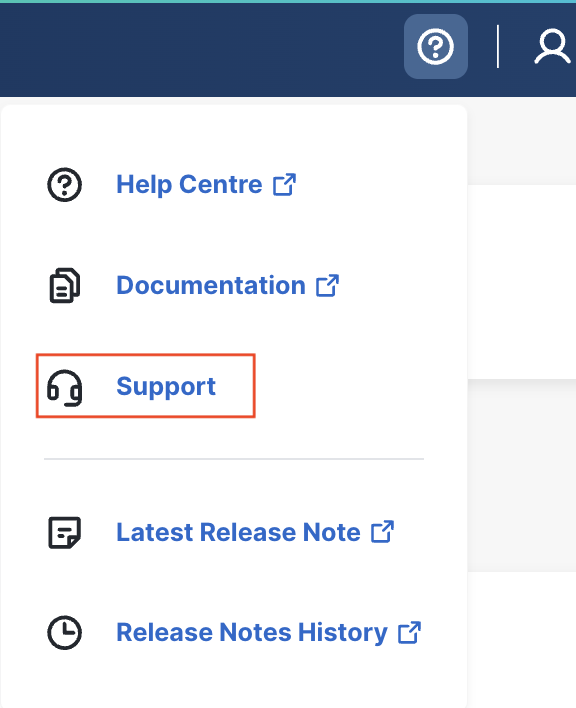
Click on Open a Case. For any supported with Third Party Partner Applications, open a General Support case. 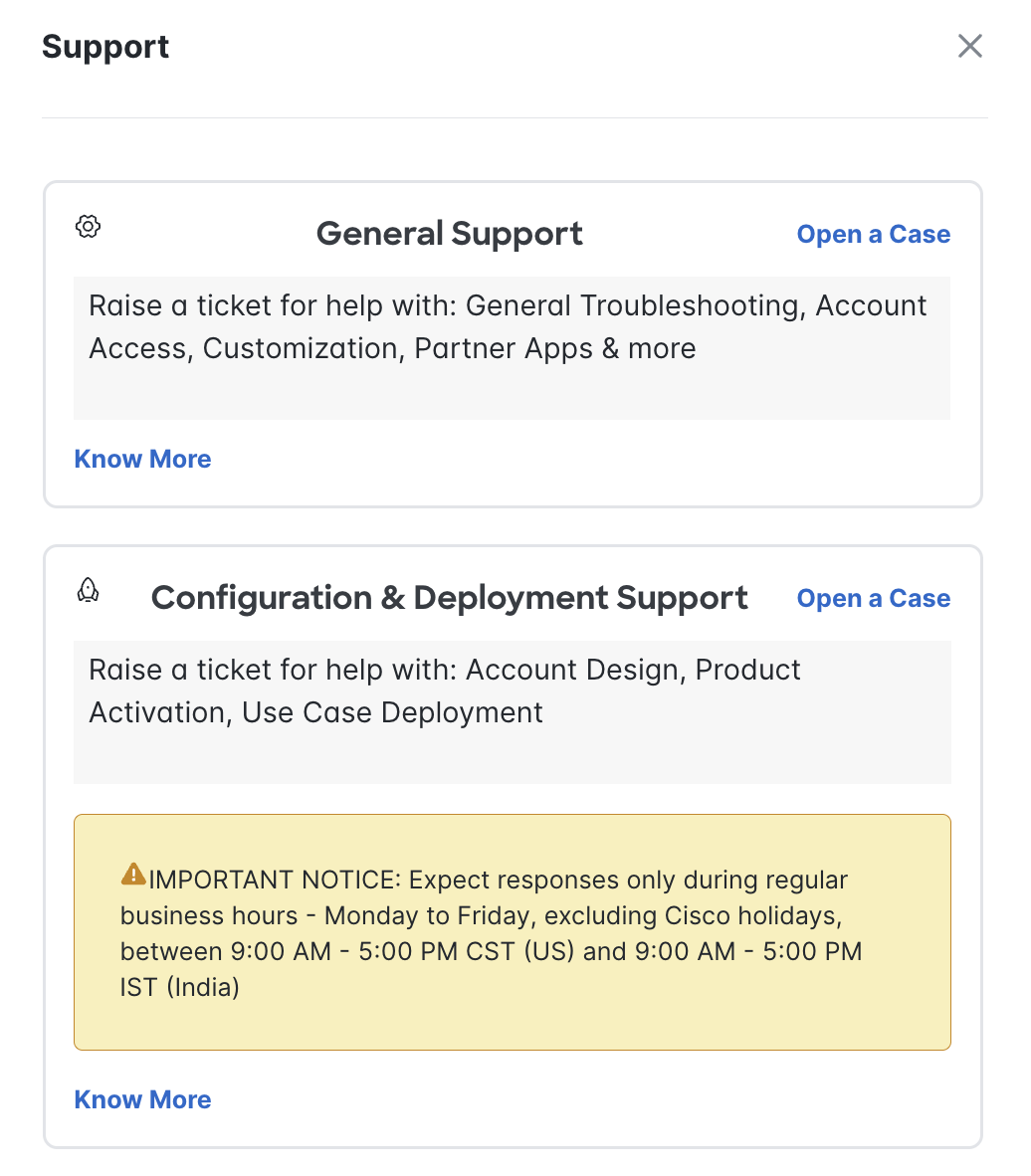
|
|
|
For customers requiring support outside the dashboard or during onboarding. |
Partners should continue to use their established support processes for issues specific to their applications. When investigation indicates that the issue involves the Cisco Spaces platform or the integration between Cisco Spaces and the partner application, the Partner Support team should engage the Cisco Spaces Partner Team and, where appropriate, Cisco TAC.
Case Ownership
The organization receiving the support request performs the initial triage and determines the primary owner based on the affected component.
If the issue spans multiple systems or ownership cannot be determined during initial triage, Cisco Spaces, Cisco TAC (where applicable), and the Partner organization collaborate to investigate the issue while maintaining a coordinated communication path with the customer.
The Cisco Spaces Partner Team facilitates collaboration between all participating teams to ensure clear ownership, timely communication, and effective resolution of joint support cases.
Selecting the Appropriate Support Categories
When creating a Cisco Spaces support request, selecting the appropriate support category (sub-tech keyword) is essential. The selected category determines how the case is routed internally within Cisco and ensures that the appropriate support organization is engaged from the outset.
Selecting the correct support category helps:
-
Route the case to the appropriate Cisco support team.
-
Accelerate technical investigation and resolution.
-
Ensure the correct engineering and business unit teams are engaged when required.
-
Reduce unnecessary case re-assignments.
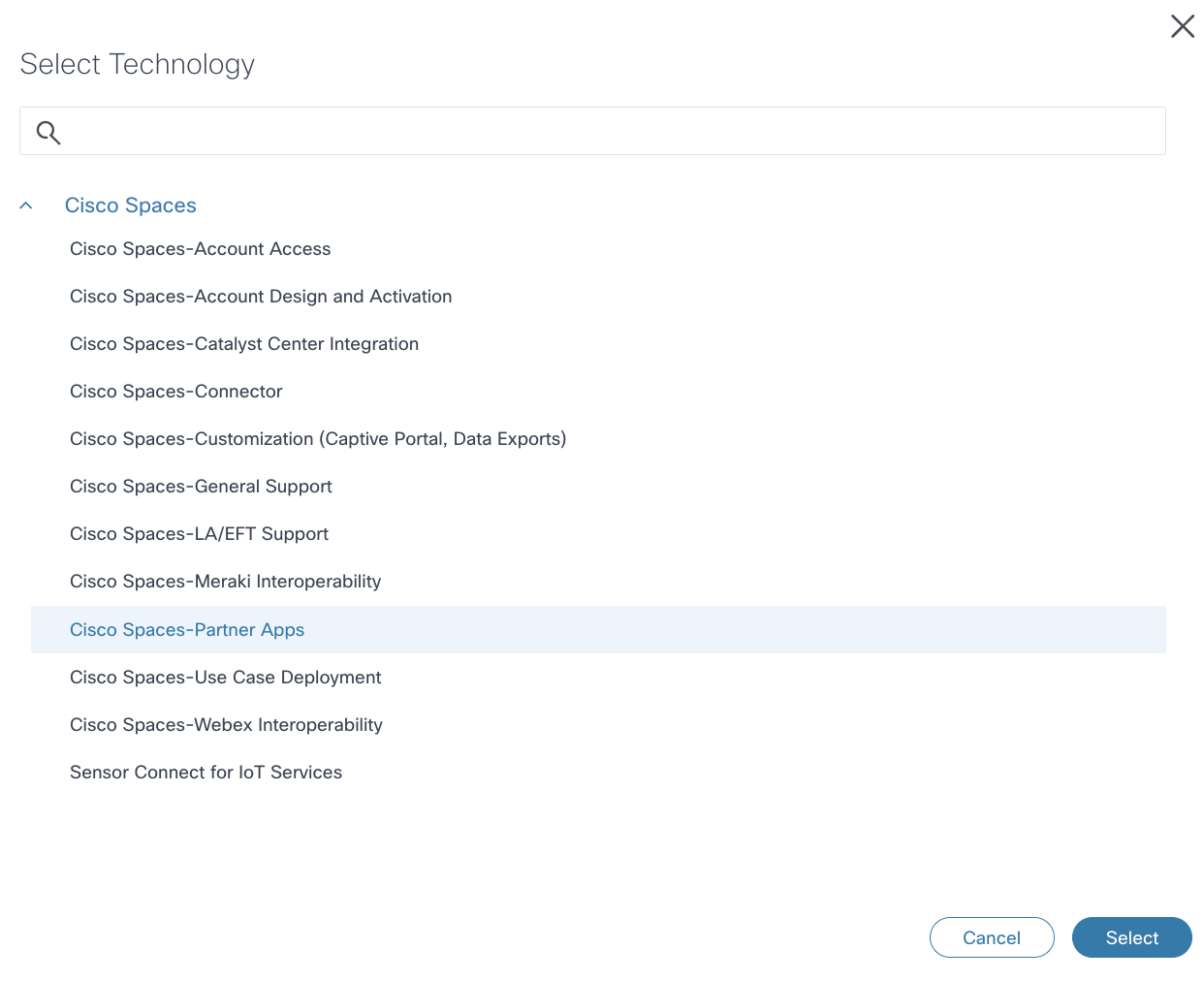
The following support categories are available for Cisco Spaces:
|
Support Category |
Typical Use Case |
|---|---|
|
Cisco Spaces – General Support |
General Cisco Spaces platform issues and break-fix support that do not fall under a specialized category. |
|
Cisco Spaces – Partner Apps |
Partner application onboarding, activation, marketplace integration, API and event integration, partner data exchange, data synchronization, and joint troubleshooting involving Cisco Spaces and partner applications. |
|
Cisco Spaces – Connector |
Cisco Spaces Connector deployment, connectivity, synchronization, and high availability issues. |
|
Cisco Spaces – Catalyst Center Integration |
Catalyst Center integration, map synchronization, client visibility, and integration issues. |
|
Cisco Spaces – Webex Interoperability |
Cisco Spaces and Webex integration, Control Hub dependencies, and interoperability issues. |
|
Cisco Spaces – Meraki Interoperability |
Meraki integration, location synchronization, and client data visibility. |
|
Cisco Spaces – Customization (Captive Portal, Data Exports) |
Captive Portal configuration, Data Exports, and supported customization features. |
|
Cisco Spaces – Account Access |
Tenant access, licensing, account provisioning, and account-related requests. |
|
Cisco Spaces – Account Design and Activation |
New account setup, tenant activation, and onboarding support. |
|
Cisco Spaces – Use Case Deployment |
Deployment guidance and configuration support for Cisco Spaces use cases. |
|
Cisco Spaces – LA/EFT Support |
Support for eligible Limited Availability (LA) and Early Field Trial (EFT) customers. |
|
Sensor Connect for IoT Services |
Sensor Connect deployment, onboarding, connectivity, and IoT service-related issues. |
For issues involving Cisco Spaces Marketplace applications or partner integrations, select Cisco Spaces - Partner Apps. If the issue is subsequently determined to involve another Cisco Spaces component, the receiving support team will coordinate with the appropriate teams without requiring the customer or partner to create a new support request.
Case Ownership & Joint Investigation
Once a support request is created, the receiving support organization performs an initial technical triage to validate the reported issue, assess business impact, review the information provided, and determine the component most likely affected.
Initial Technical Triage
The receiving support team is responsible for:
-
Reviewing the reported issue and validating the symptoms.
-
Confirming deployment configuration against the applicable Joint Use Case Runbook.
-
Reviewing logs, diagnostics, screenshots, and other supporting information.
-
Identifying the Cisco Spaces support category associated with the issue.
-
Determining the primary owner responsible for driving the investigation.
Ownership Determination
Support ownership is established based on the component where the issue is determined to originate.
-
Ecosystem Partner Support owns issues related to the partner application, application logic, user interface, and partner-managed services.
-
Cisco TAC owns issues related to the Cisco Spaces platform, APIs, connectors, integrations, and supported platform services.
Ownership may transition during the investigation if additional evidence indicates that another component is responsible. Any ownership transition should be clearly communicated between all participating teams.
Joint Investigation
If the issue spans multiple systems or ownership cannot be determined during initial triage, a joint investigation is initiated.
During a joint investigation:
-
Cisco TAC investigates Cisco Spaces platform components.
-
Ecosystem Partner Support team investigates partner-owned components.
-
A dedicated Webex Space may be established for high-priority or cross-functional issues to facilitate real-time collaboration, information sharing, and status updates.
-
All participating teams share relevant logs, diagnostics, findings, and next steps while maintaining a coordinated communication path with the customer.
The objective of the joint investigation process is to establish clear ownership, minimize unnecessary handoffs, and ensure timely resolution through coordinated troubleshooting across all participating organizations.
CREATING A CISCO TAC CASE
Cisco Technical Assistance Center (TAC) provides technical support for Cisco Spaces platform services, APIs, connectors, and supported integrations. Within the Cisco Spaces Partner Ecosystem, Cisco TAC is engaged when an issue is determined to involve the Cisco Spaces platform or when platform-level technical investigation and engineering support are required.
When to Engage Cisco TAC
Cisco TAC should be engaged when:
-
The issue is suspected to originate from the Cisco Spaces platform or cloud services.
-
Cisco Spaces APIs, event streams, or supported integrations are not functioning as expected.
-
Connector, Catalyst Center, Meraki, Webex, or other supported Cisco Spaces integrations require platform-level investigation.
-
A platform defect, software bug, or infrastructure issue is suspected.
-
Engineering engagement is required to investigate or develop a software fix.
-
A production issue has significant customer impact and requires coordinated investigation across multiple Cisco teams.
Issues that are isolated to partner application logic, user interface, business workflows, or partner-managed infrastructure should continue to be managed by the Partner Support organization
Partner Engagement with Cisco TAC
Partners are encouraged to perform initial troubleshooting using the applicable Joint Use Case Runbooks and Knowledge Articles before engaging Cisco TAC.
When the investigation indicates that the issue involves the Cisco Spaces platform, partners may engage Cisco TAC through one of the following approaches:
Paid Customer Accounts
For paid customer deployments:
-
Customers may create a Cisco TAC Service Request (SR) directly using the Cisco Spaces Dashboard, Cisco Spaces Support Portal, or Cisco Support Portal.
-
Partners may also create a TAC Service Request on behalf of the customer when authorized to do so, ensuring that all relevant customer and deployment information is included.
-
During case creation, the appropriate Cisco Spaces support category (sub-tech keyword) should be selected to ensure accurate case routing.
-
Partners should notify the Cisco Spaces Partner Team for issues requiring joint investigation or coordination across multiple organizations.
Trial and Proof of Value (PoV) Accounts
For trial and PoV deployments, the support engagement model differs from paid customer accounts.
-
Trial and PoV support requests should follow the Cisco Spaces onboarding and trial support process.
-
Where Cisco TAC engagement is required, partners should engage the Cisco Spaces BU whenever platform-related issues are encountered in trial or PoV environments to ensure the appropriate internal teams are involved.
Regardless of the account type, partners should provide:
-
Cisco Spaces Tenant ID
-
Customer Organization Name
-
Service Request (SR) number, if one already exists
-
Relevant logs, screenshots, timestamps, and diagnostics
-
API request or correlation IDs (where applicable)
-
Business impact and reproduction steps
Providing complete diagnostic information during case creation enables Cisco TAC and the Cisco Spaces Partner Team to begin technical investigation without unnecessary delays.
Cisco Spaces Partner Account
If you are an Ecosystem Partner and have an Cisco Spaces tenant, create a TAC case from the Cisco Spaces Dashboard, select the options in the screenshot below and open a case.
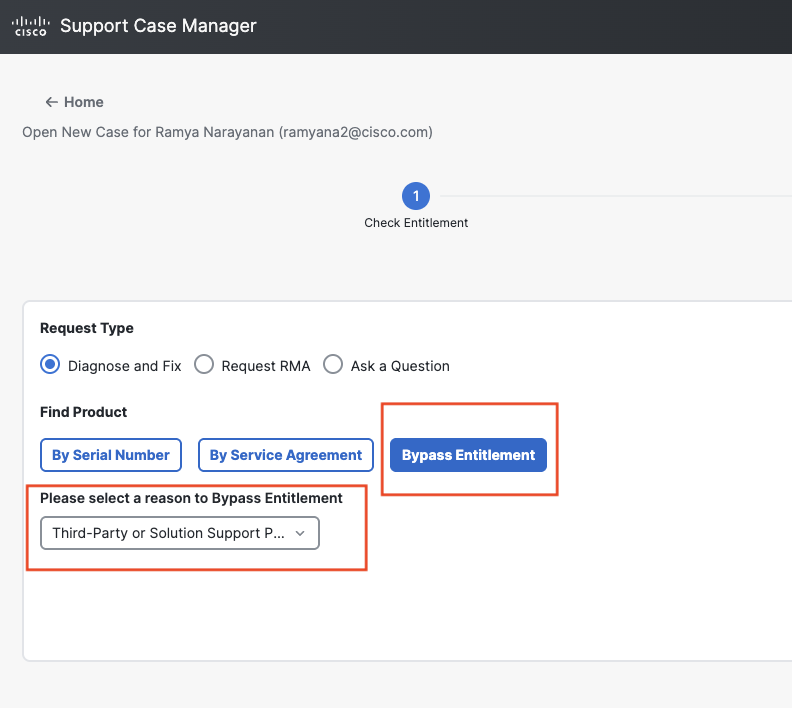
Partners should provide:
-
Cisco Spaces Tenant ID
-
Relevant logs, screenshots, timestamps, and diagnostics
-
API request or correlation IDs (where applicable)
-
Business impact and reproduction steps