
Deduplication is the essential process that Spaces uses to calculate people presence within a space, by counting Wi‑Fi devices. Since most individuals carry multiple Wi‑Fi‑enabled devices—such as smartphones, tablets, or laptops—the raw device count will not be representative of the number of people within a Space. The ratio between people and devices is an ever changing metric, which is why Spaces leverages a couple of key mechanisms to make people counting as accurate as possible.
Choosing the Right Deduplication Mechanism
Within Spaces today, we have 3 key mechanisms for deduplicating. Usability of these features will depend on a few factors, such as the type of certs or usernames onboarded, use of SSIDs, and whether hashing has been enabled on the Spaces Connector. The appropriate mechanism depends on the combination of these factors.
Deduplication Mechanisms Flow Chart
This flow chart references the same data as below, but allows you to follow a flow chart format to decide which mechanism is right and available for your deployment.
.png?cb=4ecf8267020a410a5e5fbed40034c7a8)
To understand each of the elements in this flow chart, continue to read on for the deduplication factors.
Deduplication Factors
This section will cover all of the factors that impact which mechanism of deduplication we can use, or whether deduplication is possible.
Username makeup
This is whether there is a user tied to the 802.1X username, or not. For example, a username of ‘jdoe@cisco.com’, is attribute to a user. This is generally known as a user certificate and is commonly associated with PEAP/MSCHAPv2 username/password logins. This is relevant to deduplication, as Spaces can simply count the number of users we see. In this document, this will be known as ‘Person in Username’.
If we have a device tied to the username field, this makes it slightly more complex to count users. This is most common with 802.1X setups that use host certs, which means authenticating the device to the network rather than the user on that device. In this document, this will be known as ‘Device in Username’.
Finally, if we don't have usernames in Spaces at all, we have an even more challenging environment for people counting. This is most common on networks that have captive portals, PSK authentication, or no authentication at all. In this instance, we are relying on simply knowing the MAC of a device, rather than any extra information about it. In this document, this will be known as ‘No Username’.
SSID Makeup
When counting devices as a proxy for users, the makeup of SSIDs is very important. With this instance in deduplication, we have to find a way to identify (most commonly) laptops, and count them as a proxy for users, as there will be a near perfect mapping between number of laptops, and number of users. A very easy way to do this, is to have all laptops on a single SSID, such as a cert based SSID, and everything else being on guest or BYOD. In this document, this will be known as ‘Single User SSID’.
If there is no clear SSID to count laptops on, a REGEX filter must be implemented to identify laptops on the SSID. This means, we need a clear way to identify what a laptop cert looks like, such as a prefix or suffix that is on every laptop cert. In this document, this will be known as ‘No Single User SSID'.
Connector Hashing
Connector hashing is only available for Catalyst deployments
Due to some of the filtering we have to do to identify laptops in the cases above, some methods of deduplication are not supported when hashing is enabled. The most simple way to check if hashing is enabled, is to select a client within Detect and Locate, and see if you can see the username, MAC, or IP of the client. If you cannot, and instead it says ‘hashed’, that location has hashing enabled. Throughout this document, it is called out whether mechanisms are compatible with hashing or not.
Deduplication Mechanism Compatibility Matrix
This section is designed to help decide which mechanism of deduplication is right for your deployment.
Understanding and Configuring Deduplication Mechanisms
This section is designed to help fully understand how your chosen deduplication mechansim works, and how to configure. If you have not yet decided on your mechanism, reference the above section - Choosing the Right Deduplication Mechanism.
Counting Unique User IDs
Counting Unique User IDs
This is the most common method, relying on consistent usernames (e.g. certificates or directory-based identities). It deduplicates users based on their unique identity, across multiple devices.
Effective Username Example:
-
Device 1: jdoe@company.com
-
Device 2: jdoe@company.com
→ Counted as 1 user
Ineffective Username Examples:
-
Device 1: jdoe@company.com, Device 2: jd@company.com
-
Device 1: jdoe@company.com, Device 2: HOST-1235@company.com
→ Both examples counted as 2 users due to inconsistency
Example Table (Raw Usernames):
|
MAC Address |
IP Address |
Username |
|---|---|---|
|
3C:52:82:A1:6B:7D |
10.10.10.12 |
jdoe |
|
00:1A:2B:3C:4D:5E |
10.10.14.90 |
jdoe |
|
B8:27:EB:3F:96:2C |
10.10.12.88 |
asmith |
→ Unique users counted: 2
Example Table (Hashed Usernames):
|
MAC Address |
IP Address |
Hashed Username |
|---|---|---|
|
3C:52:82:A1:6B:7D |
10.10.10.12 |
7b8e81ce82 |
|
00:1A:2B:3C:4D:5E |
10.10.14.90 |
7b8e81ce82 |
|
B8:27:EB:3F:96:2C |
10.10.12.88 |
49c3e6ac65 |
→ Unique users counted: 2, even though identities are not visible due to hashing, unique count is still the same.
Configuration
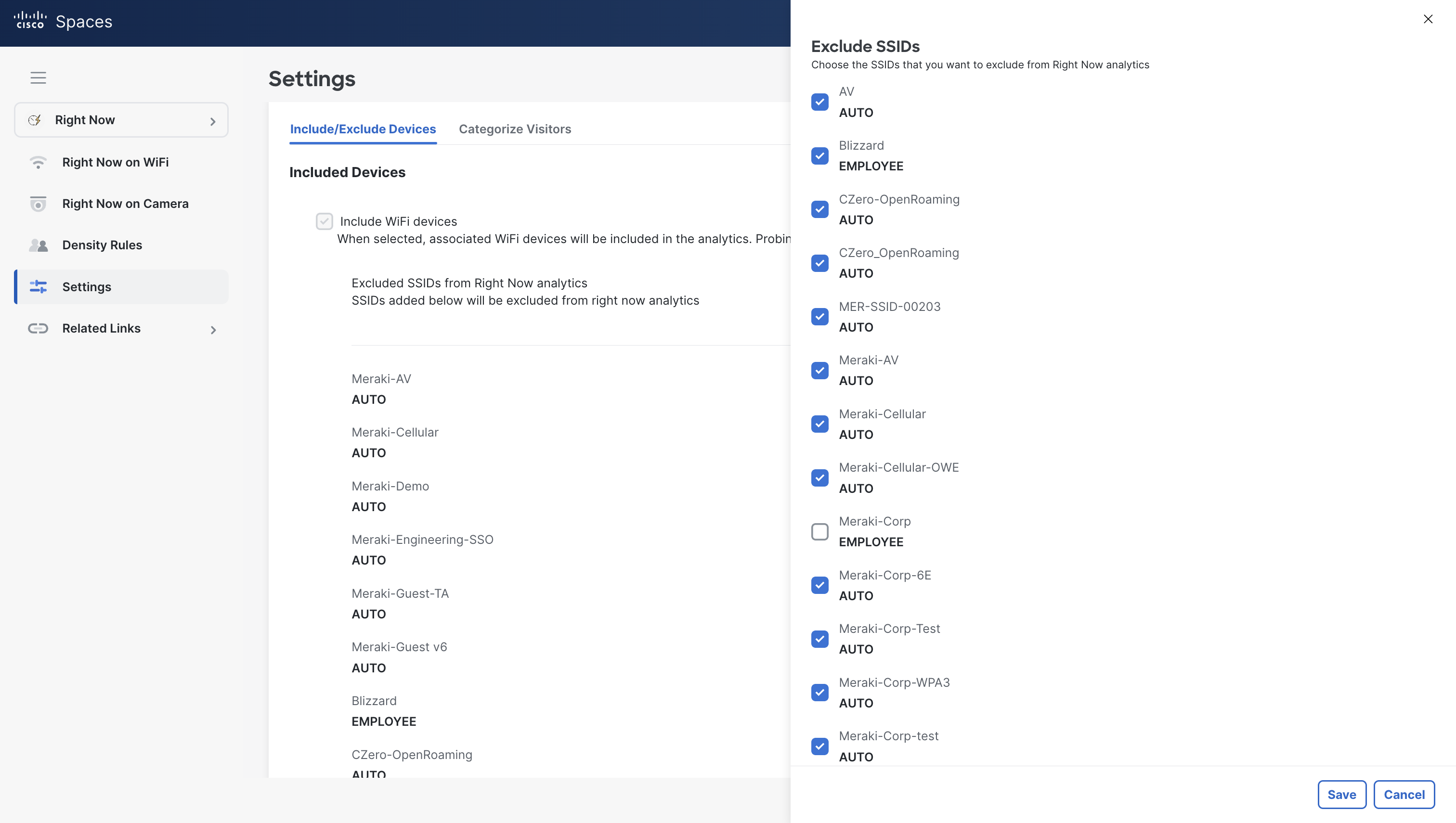
-
Log into Cisco Spaces and navigate to Right Now > Settings.
-
Select the blue pencil next to excluded SSIDs from Right Now analytics.
-
Select all SSIDs that employees do not connect to.
-
Click Save.
Counting Proxy Devices On SSID
Counting Proxy Devices On SSID
In environments where every user is assigned a unique device (e.g., a company-issued laptop), counting devices can serve as a good approximation of user occupancy. We can call these devices proxy devices, as they act as a proxy for users.
-
Count only devices connecting to a specific SSID (e.g., corporate laptops on CorpNet)
-
Filtering is handled via Spaces UI (Right Now > Settings)
-
Supports hashing
Example Table
Corporate SSID Devices:
|
MAC Address |
IP Address |
Username |
|---|---|---|
|
3C:52:82:A1:6B:7D |
10.10.10.12 |
LAPTOP-jdoe |
|
B8:27:EB:3F:96:2C |
10.10.12.88 |
LAPTOP-asmith |
Guest/BYOD Devices (excluded):
|
MAC Address |
IP Address |
Username |
|---|---|---|
|
5A:1C:8E:2F:71:AA |
10.10.5.14 |
iphone-jane |
|
30:E1:7A:55:B3:19 |
10.10.6.250 |
guest-laptop |
→ Only corporate SSID devices are counted → 2 users
Configuration
-
Log into Cisco Spaces and navigate to Right Now > Settings.
-
Select the blue pencil next to excluded SSIDs from Right Now analytics.
-
Select all SSIDs that employees do not connect to.
-
Click Save.
Counting Proxy Devices with REGEX
Counting Proxy Devices with REGEX
-
Devices are identified using a REGEX pattern (e.g. ^LAPTOP-[a-z0-9]+$)
-
Requires un-hashed data
-
Implemented via backend configuration in Spaces
Example Table:
|
MAC Address |
IP Address |
Username |
|---|---|---|
|
3C:52:82:A1:6B:7D |
10.10.10.12 |
LAPTOP-jdoe |
|
D8:6F:4C:32:9E:01 |
10.10.3.102 |
emma-tablet |
|
A4:5E:60:3E:7F:99 |
10.10.13.12 |
LAPTOP-denadams |
→ Using REGEX, 2 users are counted (devices starting with “LAPTOP-”)
This method does not support hashing due to the need to evaluate readable usernames.
Configuration
-
Log into Cisco Spaces and navigate to Right Now > Settings.
-
Select the blue pencil next to excluded SSIDs from Right Now analytics.
-
Select all SSIDs that employees do not connect to.
-
Click Save.
After configuring Right Now Settings, you must follow the next steps. This is process differs from other setups.
Now right now is complete, please raise a support case with the filter you would like to apply, to count devices as outlined above. Details should include:
Filter needed to apply (ideally in REGEX, but natural language is also great, such as “anything ending in @cisco.com)
Include or Exclude filter - do you want to include anything with that matches your filter or exclude.
Filter must have a minimum of 3 characters to provide enough accuracy. A filter such as “anything starting with an underscore will result in poor results.
Filters can be coupled up with others, with AND or OR operators. For example “Anyone with with USER/ and ends in @cisco.com OR any user that ends in @meraki.net"
FAQ
How accurate is people counting with Cisco Spaces?
Accuracy is entirely dependent on how rigorous your filtering and cert setup is. There is possibilities to get near 100% accuracy, but there will always be edge cases of users who dont carry a device, or who log into device centric SSIDs like guests.
Which apps will changing people count settings impact?
The settings configured in Right Now, will impact the following apps:
-
Right Now
-
Behaviour Metrics
-
Space Utilization
Does changing people count settings effect data from collaboration or IOT devices?
No, people counting settings configured in Right Now will only impact data coming from Wi-Fi
My users don't use .1x and I have no way to identify users any other way, how do I get accurate people counting?
Unfortunately, there will be no way for us to recognize individual users without this. Instead, you should consider other mechanisms, such as cameras or tripwire sensors, to count users.